71 live features: 22 interactive analysis modules,
7 AI engines, and the competitive-edge and platform muscle that
ties them together. Built for mortgage advisors who sell the strategy, not the rate.
Interactive visual modules that turn one strategy into a story a client can feel.
22 features
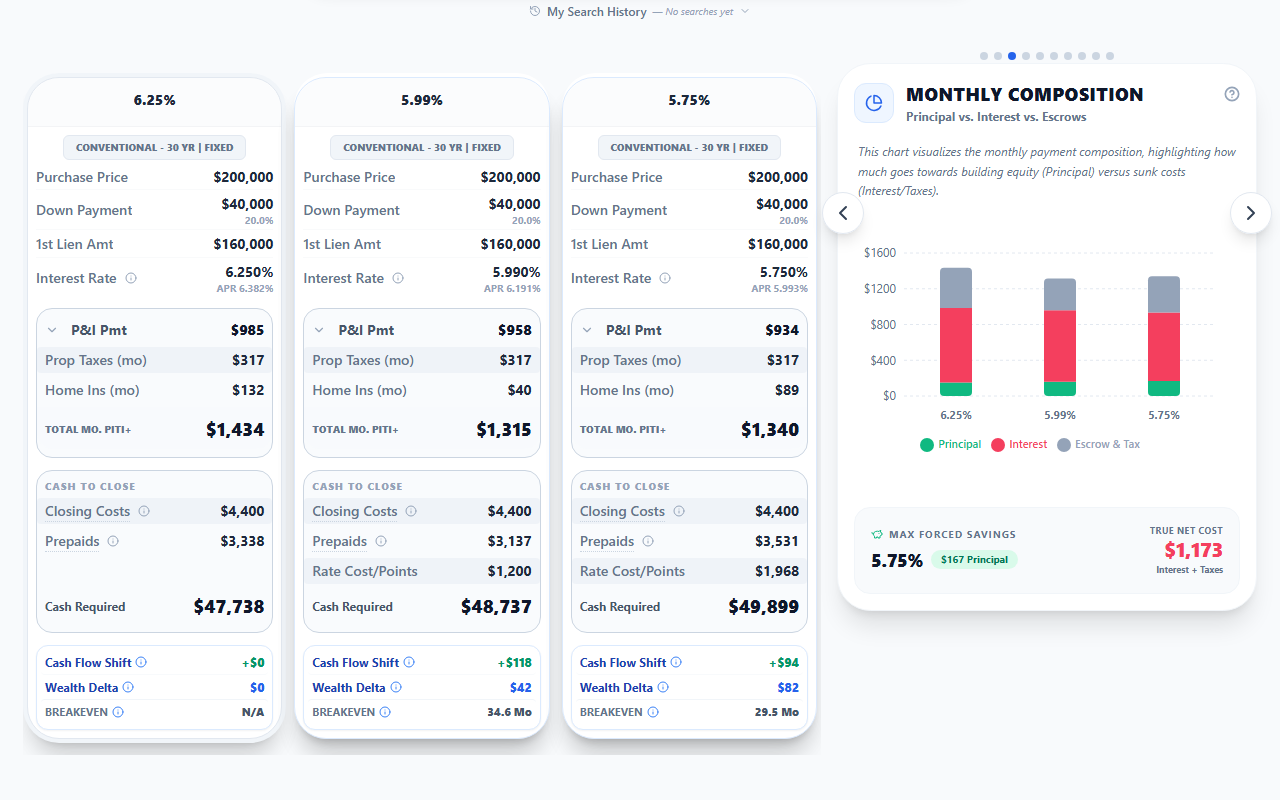
Monthly Composition
Why your $3,500 mortgage is cheaper than $2,200 rent.
Visualizes the monthly payment breakdown across Principal, Interest, and Escrows (Taxes plus Insurance). Reframes Principal as forced savings and quantifies the Max Forced Savings amount per option. Surfaces a True Net Cost figure that strips out the wealth-building components from the gross payment.
Solves: Clients who say 'my mortgage is throwing money away.' Renters who think their monthly cost is lower than ownership. Advisors who cannot reframe the rent versus buy conversation in seconds.
See it in the field
Your client says 'I am just throwing money away on a mortgage.' WealthLens shows them $1,200 of every payment is forced savings, $500 is tax benefit. The reframe lands in 8 seconds. They never look at rent the same way again.
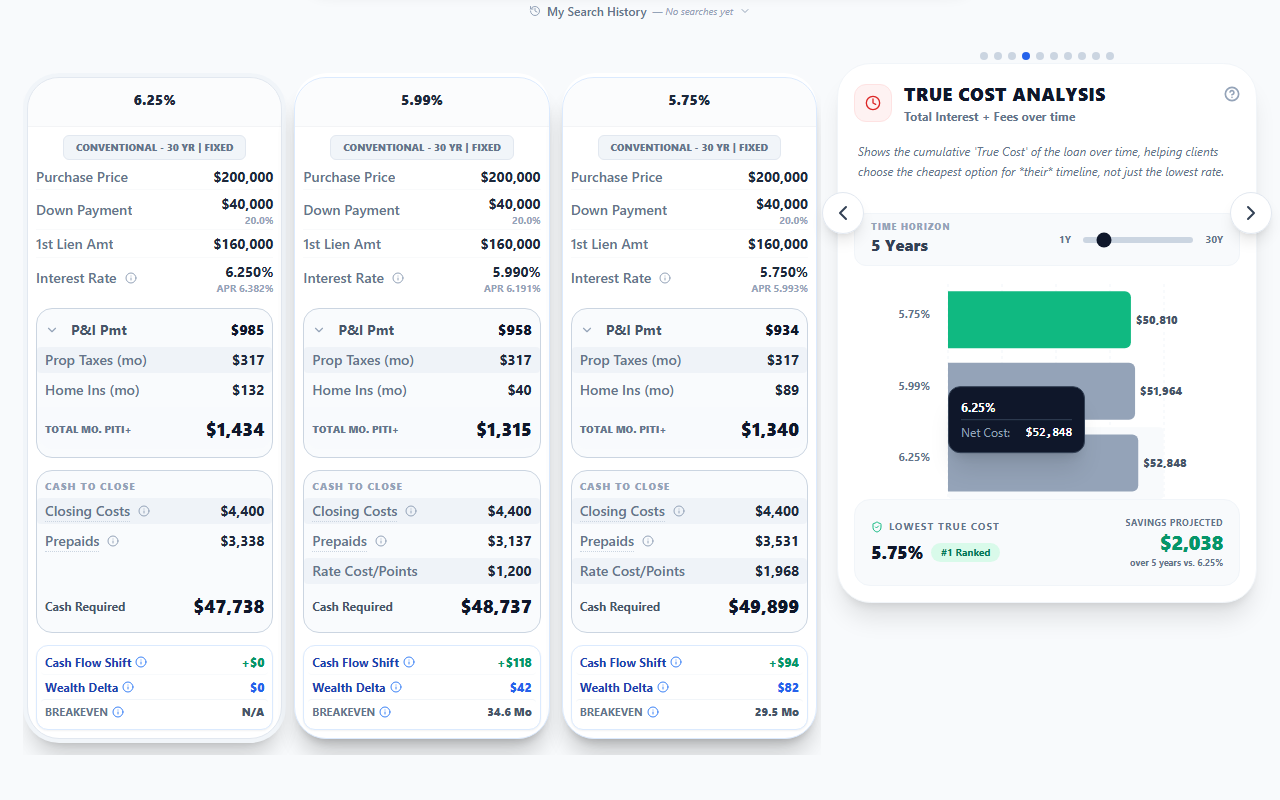
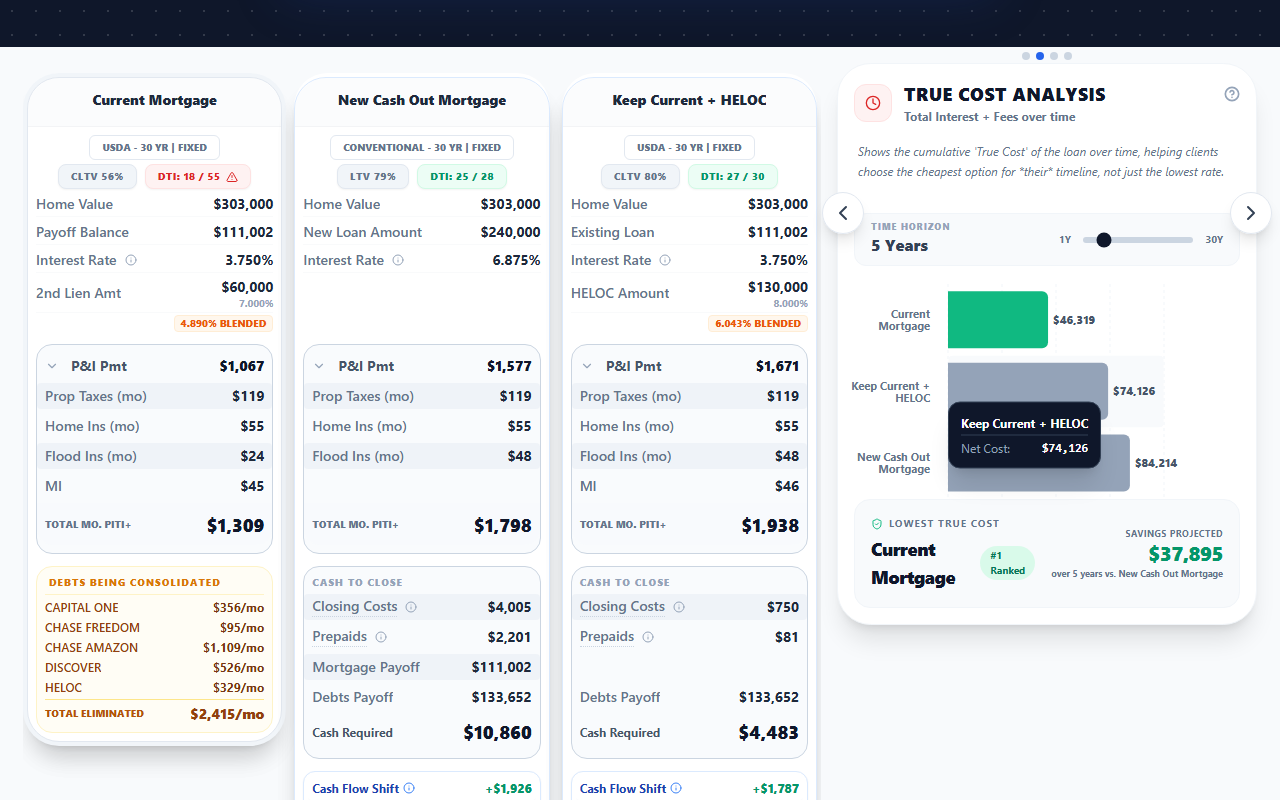
True Cost Analysis
Rate is a distraction. Total cost is the truth.
Calculates the cumulative cost of borrowing over any time horizon by summing interest, fees, mortgage insurance, and closing costs. Compares multiple loan scenarios side by side to reveal which option truly costs less when all factors are considered, exposing how a lower rate can actually cost more.
Solves: Clients fixated on rate. Advisors losing deals to competitors who quote a lower rate but hide fees. The industry-wide problem of rate-shopping without understanding total cost.
See it in the field
Your competitor quoted 6.25%. You quoted 6.5%. Your client thinks you lost. But WealthLens shows your option saves them $23,000 over 7 years because of lower fees and no MI. True Cost changes the conversation. Rate does not win. Math wins.
Purchase view Refinance view
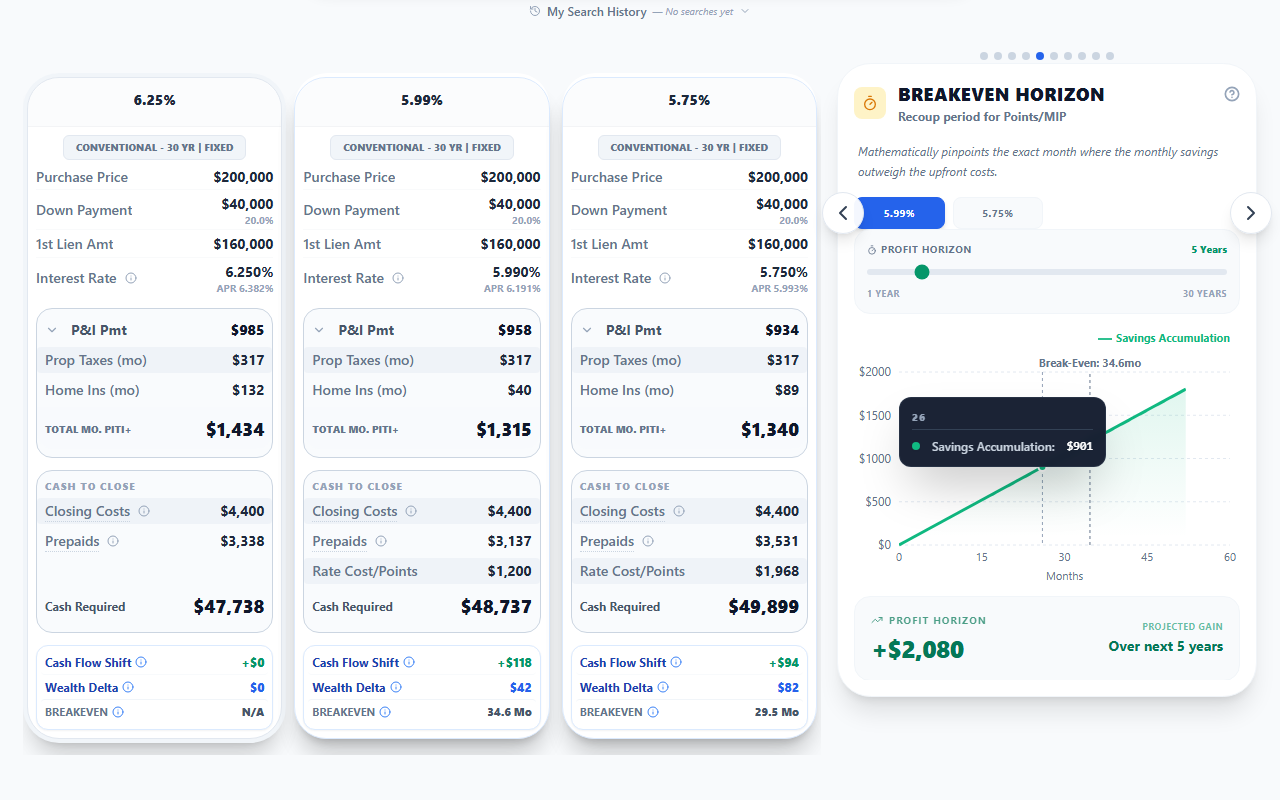
Breakeven Horizon
Points or no points? Now you have the exact answer.
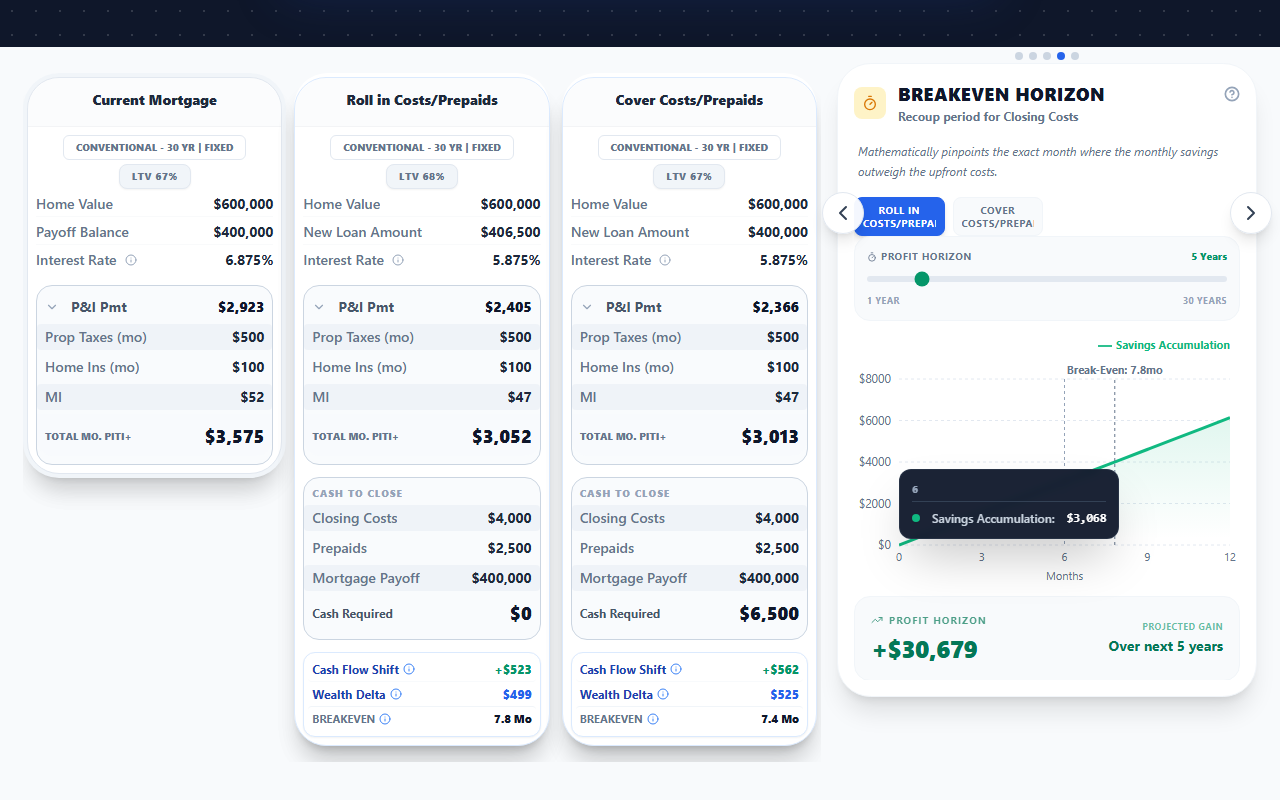
Mathematically pinpoints the exact month where monthly savings recoup upfront costs (points, closing costs, MIP). Features a Profit Horizon slider to project cumulative gain beyond breakeven. Works for both purchase (points and MIP) and refinance (all closing costs). Compares multiple scenarios side by side.
Solves: The eternal 'should I buy points?' question. Clients confused by closing cost tradeoffs. Advisors who cannot clearly explain when a refinance pays for itself.
See it in the field
Your client asks 'Should I pay points?' Instead of guessing, you pull up WealthLens and show them: 'You break even in 22 months. After that, you save $340 every single month.' Drag the slider to show them $41,000 in savings over 10 years. That is how you win trust. That is how you close.
Purchase view Refinance view
Interest Strategy
Your client is paying 139% interest. Now you can prove it.
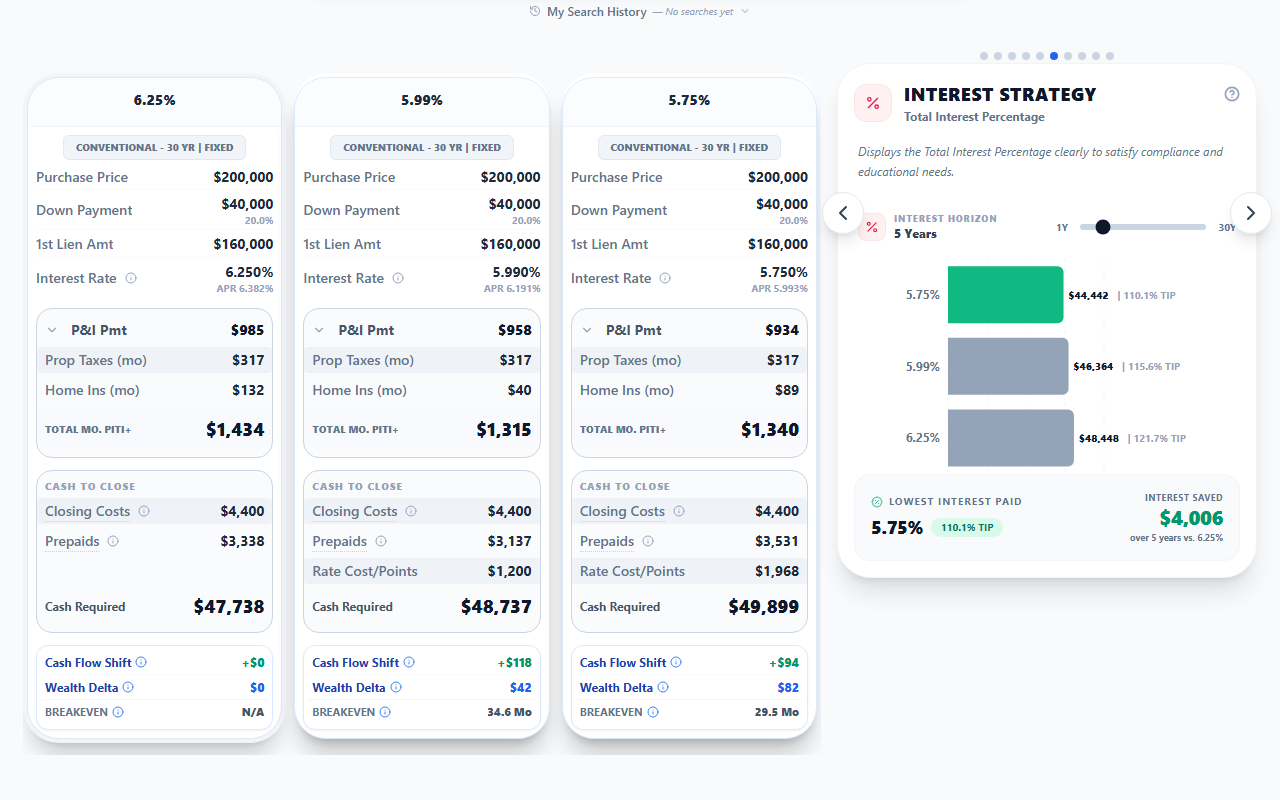
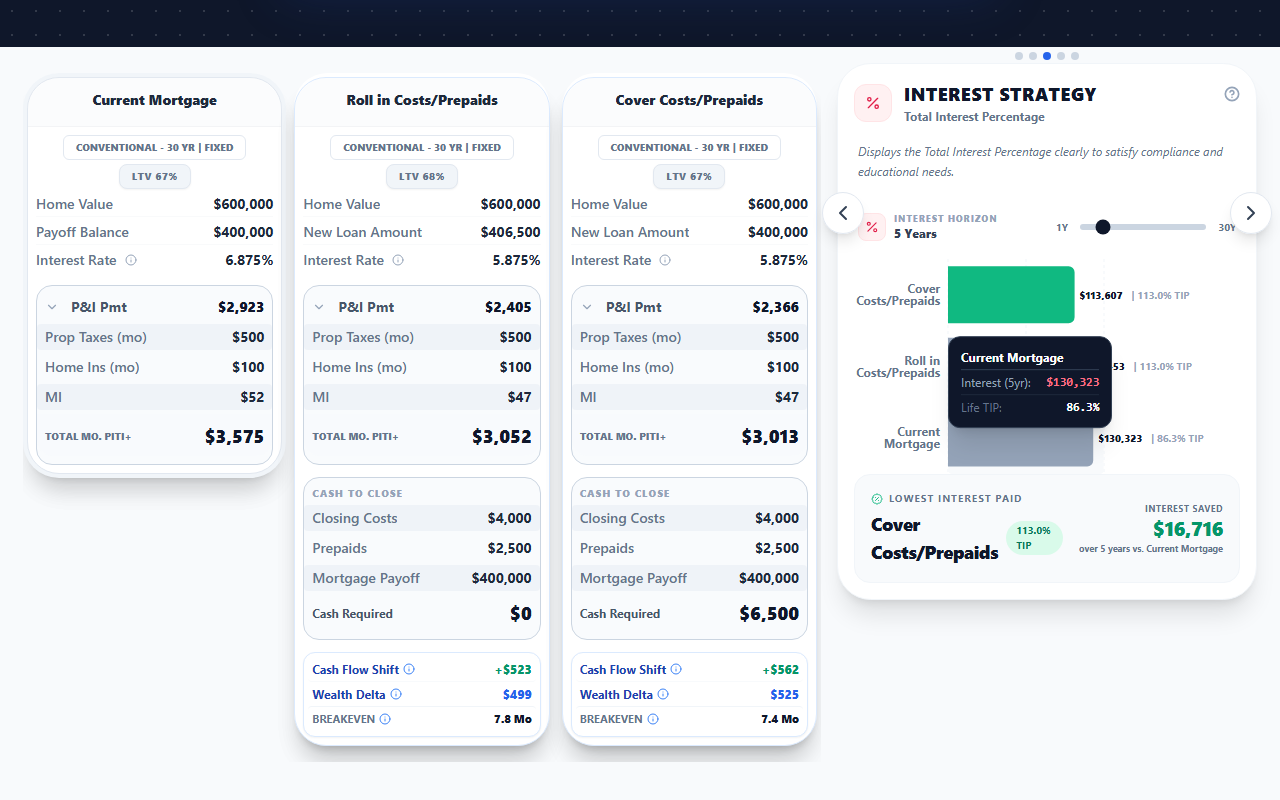
Displays the Total Interest Percentage (TIP) clearly to satisfy compliance and educational needs. Quantifies the lifetime cost of borrowing as a percentage of principal, exposing how 30-year fixed loans typically pay 80% to 140% of principal in interest alone.
Solves: Clients who think the monthly payment is the whole story. Compliance teams who need TIP disclosed cleanly. Advisors who lose objections about long amortization periods.
See it in the field
139% interest. That is what a typical 30-year loan pays over its life. Your client has never seen the number. WealthLens shows it in one chart, then turns the conversation toward strategy: rate buy-down, principal acceleration, or a shorter term. The TIP is not a scare tactic. It is the start of the wealth conversation.
Purchase view Refinance view
Real Cost of Debt
The bank is paying YOU to borrow. Show the math.
Adjusts the nominal mortgage rate for inflation, surfacing the real (inflation-adjusted) cost of borrowing. Often shows the real cost is much lower than the headline rate, sometimes negative once inflation runs above the after-tax real rate.
Solves: Clients refusing to buy because '7% is historically high.' Sophisticated buyers asking inflation-adjusted questions advisors cannot answer. The narrative gap between headline rates and real economic cost.
See it in the field
Your client says '7% rates are too high.' WealthLens shows them after inflation, the real cost of debt is 1.5%, and after tax deduction it is closer to zero. The bank is functionally paying them to borrow. Sophistication wins this argument every time.
Liquidity Safety Valve
Why putting 20% down might be a financial trap.
Compares a smaller down payment with the difference invested as cash reserves against a larger down payment. Highlights the Survival Runway (months of payments the cash buffer covers) and reveals that liquid reserves prevent foreclosure, not equity.
Solves: First-time buyers convinced they must hit 20% down to avoid PMI. Clients draining their savings into the down payment. Advisors losing deals because the client cannot mentally separate equity from liquidity.
See it in the field
Your client wants to put 20% down to dodge PMI. WealthLens shows them the smaller-down option with the difference held as cash reserves gives them 14 extra months of survival runway in a job loss. PMI costs $180 a month. Foreclosure costs everything. The math is not even close.
Wealth Accumulation
The Turtle Wins: why the 30-year often beats the 15-year.
Projects total net worth over time, combining home equity and the growth of any invested savings or payment difference. Compares 15-year versus 30-year strategies, or any two payment paths, and reveals the long-horizon Wealth Delta between them.
Solves: Clients chasing the 15-year because 'I want to be debt-free.' Advisors who cannot defend the longer term as the wealth-maximizing path. The cultural bias toward debt elimination over net worth.
See it in the field
Your client says 'I want a 15-year loan to be debt-free.' WealthLens runs Wealth Accumulation: the 30-year with the difference invested produces $94,000 more net worth at year 20. Debt-free is a feeling. Net worth is the number that matters. Show them the chart.
Cost of Waiting
Every month they wait costs them money. Now you can prove it.
Quantifies the financial cost of delaying a home purchase. Factors in projected home price appreciation, lost amortization, and forgone tax benefits over the wait period. Compares the cost of waiting against any future rate-drop scenario the client is hoping for. Surfaces an Average Loss figure and an Avg Recoup Time (years to recover the waiting costs even if rates do drop).
Solves: Fence-sitters waiting for 'the right time.' Leads who ghost after getting a rate quote. Advisors who cannot articulate urgency without sounding pushy.
See it in the field
Your prospect says 'I will wait for rates to drop.' WealthLens shows them waiting 6 months just cost them $19,000 in equity and appreciation, with a 31-year recoup time even if rates drop half a point. Not a guess. Not an opinion. Math. Send them the interactive link. Let the numbers do the selling.
Capital Deployment
Put more cash down, or keep it working? The net-worth math, side by side.
Compares the options on the deck by how much cash each one puts into the house. The cash a smaller down payment keeps free is modeled as invested at the deck's return rate, the higher monthly payment that comes with it is charged against it, and the chart tracks each option's net worth year by year. Max Investable shows the most cash any charted option frees, and the verdict names the option ahead at the horizon year the advisor picks.
Solves: Clients sitting on cash, unsure whether it belongs in the down payment or stays invested. Advisors recommending a bigger down payment without modeling the opportunity cost. The classic 20% down versus invest-the-difference question.
See it in the field
Your client has $80,000 in cash. The default move is to dump it into the down payment. WealthLens runs Capital Deployment: the 10% down option keeps the difference invested, carries the higher payment, and still finishes $63,000 ahead in net worth at year 10. One chart turns a habit into a decision.
Tax Benefit
Your real monthly housing cost is not what you think.
Estimates the annual tax savings based on the client's effective bracket and deductible mortgage interest. Translates the savings into an effective after-tax monthly housing cost, often reducing the perceived monthly burden by hundreds of dollars.
Solves: Clients who think the mortgage interest deduction 'does not matter anymore' after the 2017 tax law. Advisors who cannot quantify the after-tax effective payment. Itemizers losing the cash-flow narrative.
See it in the field
Your client thinks the mortgage interest deduction is dead. WealthLens shows them their itemized return saves $4,200 a year, dropping their effective housing cost by $350 a month. The deduction is alive. The narrative is just outdated. Show the chart.
Rent vs. Own
Stop the rate debate. Show the wealth math.
Side-by-side comparison of renting versus buying over any time horizon. Calculates the Net Effective Cost of owning (Payment minus Principal minus Tax Benefit minus Appreciation) and compares it to total rent paid. Visualizes the moment where buying overtakes renting in total wealth, even accounting for maintenance, property taxes, and down payment opportunity cost.
Solves: Clients stuck on the sidelines because they think renting is cheaper. First-time buyers paralyzed by the down payment. Advisors losing deals to the 'wait for rates to drop' mindset.
See it in the field
Your client thinks renting is saving them money. WealthLens shows them the $247,000 in wealth they are giving away over 10 years. One interactive link. No spreadsheets. No arguments. Just the math.
Appraisal Gap
How long until your winning bid is break-even on appreciation.
Two distinct use cases. (a) When the home appraised below contract price: shows how loan structure absorbs the gap without killing the deal. (b) When bidding over asking: time-based math showing how many months until natural appreciation catches up to the aggressive bid.
Solves: Buyers walking from deals over appraisal gaps. Bidding wars where the buyer second-guesses paying over asking. Advisors without a structured framework for either situation.
See it in the field
Your client wins the bidding war by going $20,000 over appraisal. They panic that they overpaid. WealthLens shows them at the local 5% appreciation rate, the home is back to break-even in 14 months. The deal closes. The buyer sleeps tonight. You look like a strategist.
Buydown Strategy Visualizer
The antidote to rate anxiety, eased in one year at a time.
Reads the temporary buydown set on the selected purchase card and lays out the year-by-year table: the reduced rate and payment in each eased year, the note-rate payment after, the total subsidy, and whether a seller-paid share that size sits within the interested-party limit. The note rate is fixed; only the first years' payments are reduced, and the card, the module and the PDF always agree.
Solves: Buyers terrified of high-rate environments. Sellers willing to offer a concession but not understanding the mechanism. Advisors stuck explaining a 2-1 buydown for the third time today.
See it in the field
Your buyer is rate-anxious. The seller is willing to offer a concession to close. Set the 2-1 on the card and WealthLens lays it out: a seller-paid share funds the first two years, payments step up cleanly, the note rate stays the same, and the cost sits in plain view at the closing table. One table, one conversation, one closed deal.
Refi Strategy Matrix
Your Refi Strategy Matrix says the math works. Here is the proof.
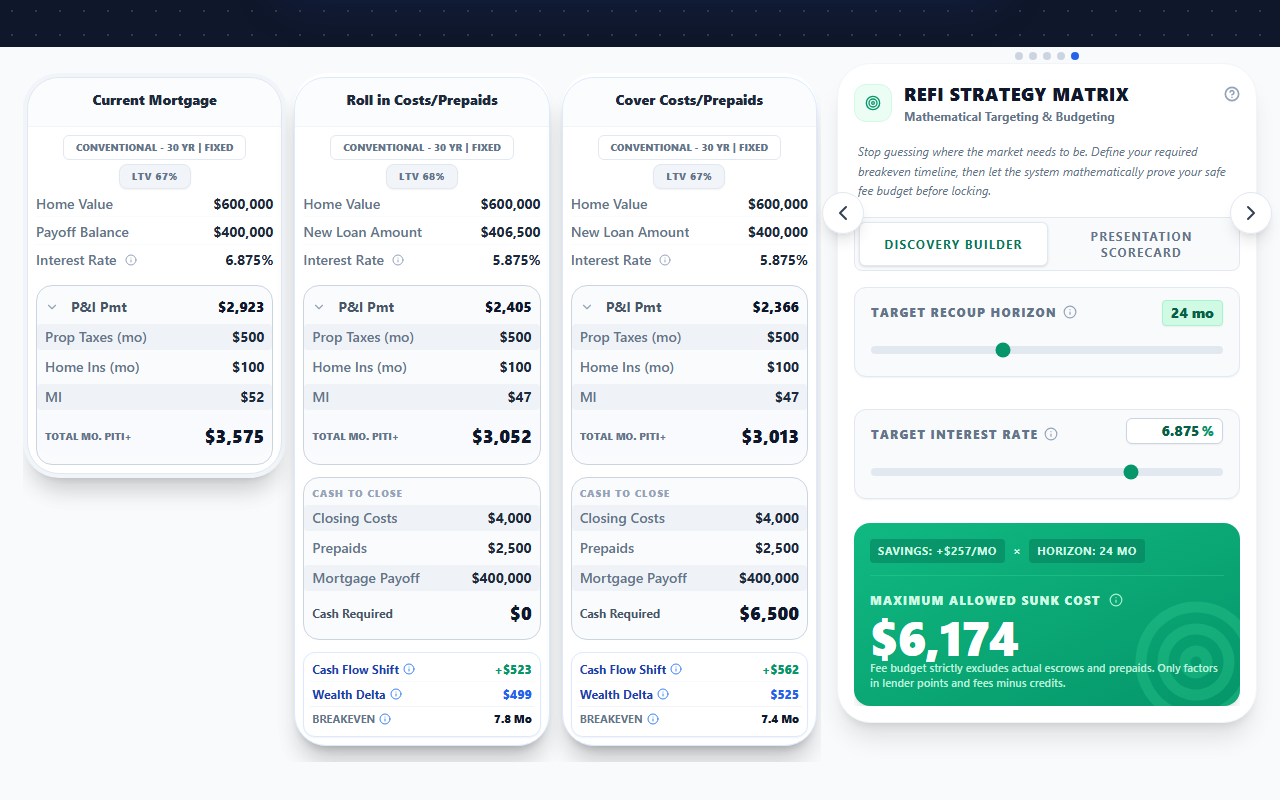
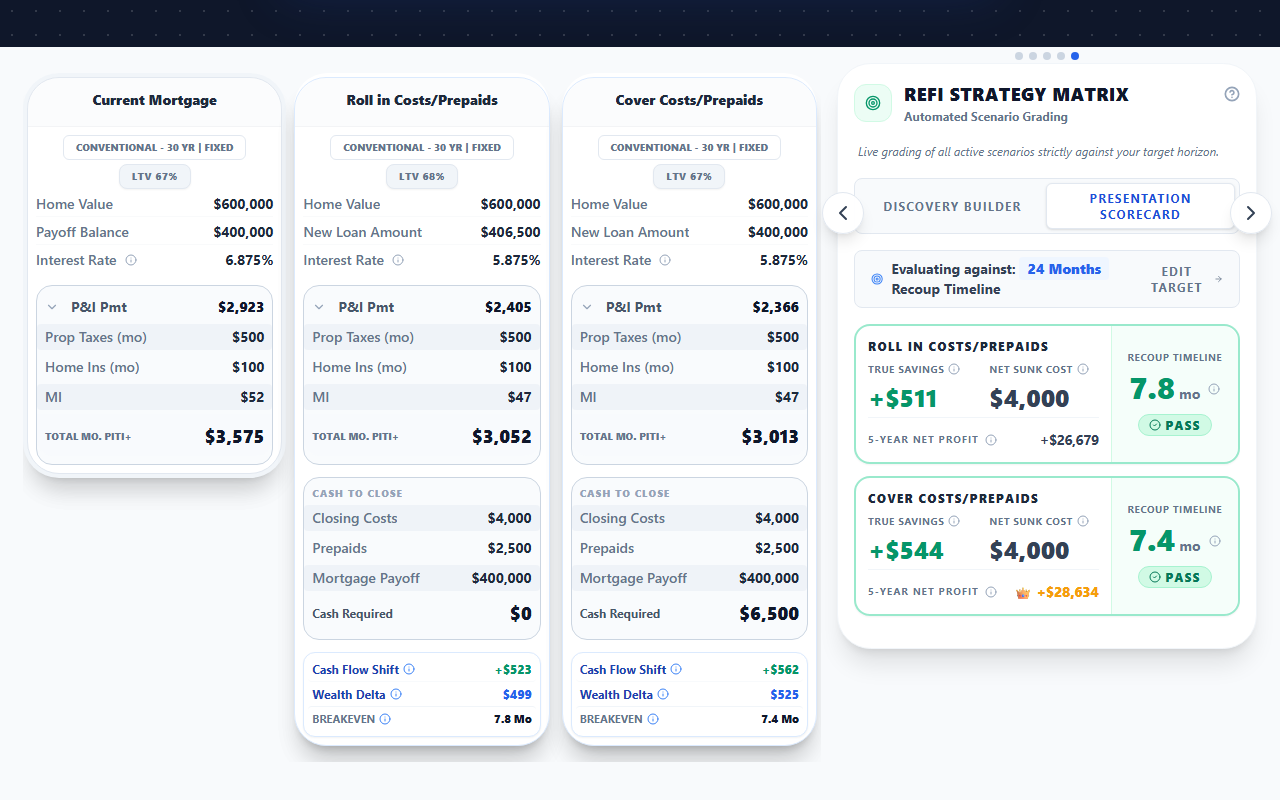
Inverts the traditional refi process. The Discovery Builder calculates the exact fee budget given a target recoup horizon, instead of guessing rate then guessing costs. Includes a Presentation Scorecard that grades the resulting strategy across multiple dimensions.
Solves: Refis built backward: pick a rate, hope the costs work, hope the breakeven is short enough. Advisors who lose refi deals because the math is opaque. Clients who do not trust the recoup story.
See it in the field
Your competitor is still building refis backward. You start with the question 'what is the longest recoup my client will accept' and let WealthLens reverse-engineer the fee budget. The Presentation Scorecard grades the result. The client sees the math behind the recommendation. The refi closes.
Refinance view Presentation Scorecard
Liability Optimization
What rolling the debts into this refi does to the household rate. And how much it frees up.
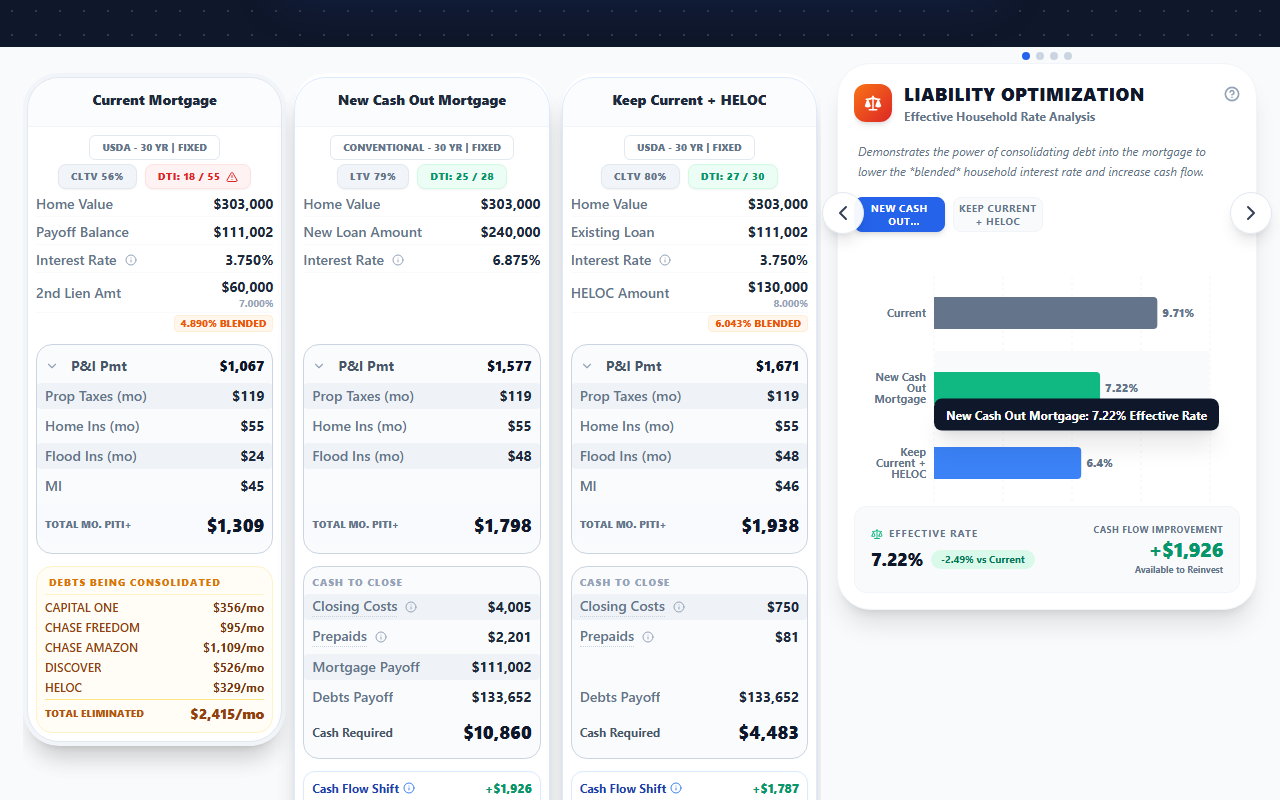
Demonstrates the power of consolidating high-interest household debts into a refinance. Calculates the blended household interest rate before and after, the monthly cash flow improvement, and how much that frees up to reinvest. The advisor marks which of the client's debts the refinance pays off; the module shows the effect of that choice.
Solves: High-interest household debts that hide in the background. Refis that ignore the debt picture and miss the wealth lift. Advisors who cannot quantify the consolidation case.
See it in the field
Your client has a 6.5% mortgage and $34,000 in credit card debt at 22%. WealthLens runs Liability Optimization: rolling the cards in drops the blended household rate from 11.4% to 6.8% and frees $890 a month in cash flow. The refi pays for itself before they sign the docs.
Wealth Accelerator
How to turn this refi into $X in additional net worth.
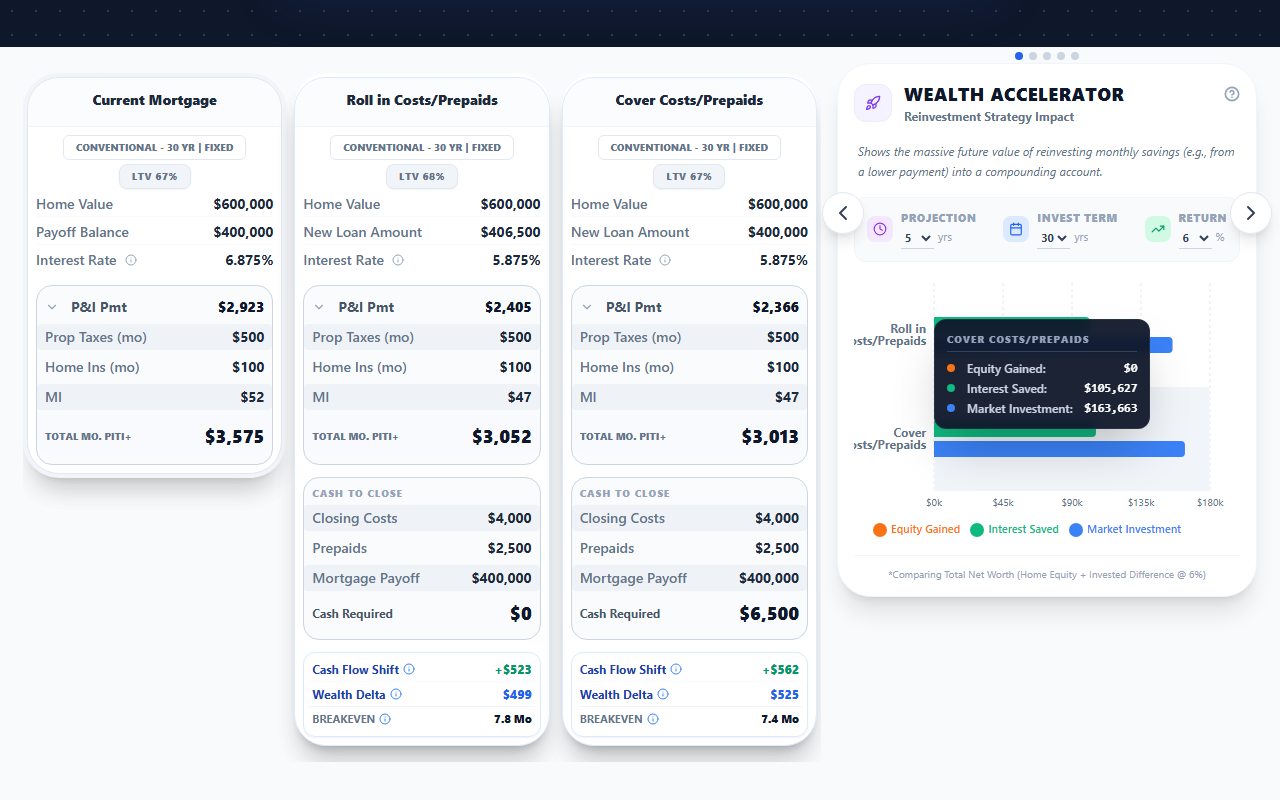
Shows the compounded future value of redirecting monthly refi savings (e.g., from a lower payment) into a long-horizon investment account, instead of letting the savings dissolve into lifestyle creep. Models contribution growth at any expected return.
Solves: Refi savings that disappear into discretionary spending within 90 days. Advisors who cannot demonstrate the compounding benefit of disciplined reinvestment. Clients who treat a $300 monthly refi savings as a shopping budget.
See it in the field
Your client refis and saves $340 a month. The default outcome is the savings vanish. WealthLens runs Wealth Accelerator: $340 a month invested at 7% becomes $172,000 in 20 years. The same refi. A different conversation. A different client outcome.
Refinance Cost of Waiting
Waiting 6 months for 0.25% lower often costs more than it saves.
Refinance-specific Cost of Waiting analysis. Quantifies the forgone monthly savings of holding off on a refi while waiting for a hoped-for further rate drop, and calculates the recoup period needed for that future lower rate to actually pay off versus refi-ing now.
Solves: Clients who keep waiting for the next quarter-point drop. Advisors who cannot articulate the math of acting now. The retention nightmare of clients refi-ing with someone else when rates do drop because their original LO never closed the loop.
See it in the field
Your client is waiting for one more quarter-point drop. WealthLens runs Refinance Cost of Waiting: the savings they are forgoing every month adds up to $4,200 over 6 months. Even if rates do drop another quarter point, the recoup period on the lower rate is 18 months. Acting now wins. The math is not even close.
Mortgage Accelerator
A standard 30-year becomes a 22-year wealth-building asset.
Visualizes the exponential impact of small extra principal payments on payoff timeline and total interest paid. Shows the year-over-year payoff acceleration from contributions as small as $100 a month.
Solves: Clients who feel paying off a 30-year mortgage is unreachable. Advisors who cannot make the case for principal acceleration without sounding like a financial advisor. The cultural inertia around making minimum payments.
See it in the field
Your client thinks the 30-year is a 30-year. WealthLens shows them an extra $200 a month turns the 30-year into a 22-year payoff and saves $84,000 in interest. The chart shows it visually. The client gets it instantly. Acceleration is no longer abstract.
Capital Accelerator
Pay down 6.5% mortgage or invest for 7% market return?
Unified view merging Mortgage Accelerator and Wealth Accelerator. The same extra dollars run down two paths on one chart: extra principal on the mortgage, or invested at the market return. It compares net worth at the year the advisor measures and names the path that comes out ahead, and by how much. Useful for clients with surplus cash who want a single chart that answers the pay-down-or-invest question.
Solves: Clients with idle cash and no framework. Advisors juggling separate Mortgage Accelerator and Wealth Accelerator analyses for the same client conversation. The cognitive load of comparing across two modules.
See it in the field
Your client has $400 a month of surplus cash. The pay-down side says 'extra principal.' The invest side says 'market.' WealthLens runs Capital Accelerator: both paths on one chart, the actual net-worth math, and a verdict on which one wins by the year you measure. One chart, one path forward.
ARM Adjustment Outlook
The box the contract builds around an ARM payment, drawn on one chart.
Charts the payment plateau through the fixed period, then a shaded band from the payment if the rate never moves up to the worst case the caps allow, laddered year by year until the lifetime cap pins the ceiling flat. The advisor’s assumed rate draws as its own line inside the band, and a seasoned ARM that already adjusted charts the remaining ladder from today.
Solves: Clients who hear adjustable and imagine an uncapped payment, and advisors stuck explaining caps with a rate sheet and a napkin. The worst case, best case, and planning assumption all lived in different places until now.
See it in the field
Most tools show an ARM as a rate and a hope. WealthLens draws the guardrails: the floor if rates stay put, the contractual ceiling the caps allow year by year, and the line where the advisor actually plans. No rate predictions, ever. The floor and ceiling are arithmetic on the caps in the note, and the middle line is labeled as the advisor’s assumption. Pointed at a client’s existing ARM that already adjusted, the same chart becomes the stay-or-refinance conversation.
Flip Profit & ROI
Show the investor the number that matters: net profit and annualized ROI.
The sell-exit module for a Fix N Flip. Takes the after-repair value, subtracts the all-in cost, interest carry, holding, and selling costs, and shows net profit, ROI over cash invested, and annualized ROI side by side.
Solves: Investors deciding on a deal off a gut feel. Profit math scattered across a spreadsheet. No clean way to show a client the return before they commit the cash.
See it in the field
An investor doesn't buy a payment, they buy a return. Flip Profit & ROI lays out net profit, cash-on-cash ROI, and annualized ROI from the after-repair value down to the selling costs, so the decision is a number on the screen, not a hunch.
BRRRR Exit Analysis
Show how much cash comes back out at the refinance.
The keep-and-refinance exit for a Fix N Flip. Models the Buy-Rehab-Rent-Refinance-Repeat play: after the rehab forces the value up, it shows how much of the invested cash is recouped at the cash-out refinance.
Solves: Investors who want to keep the property but can't see whether the refinance gives their capital back. BRRRR math done by hand. No way to compare keeping versus selling on the same deal.
See it in the field
Not every flip gets sold. BRRRR Exit Analysis shows the investor exactly how much of their cash comes back out at the cash-out refinance once the rehab forces the value up, so they can compare keeping the rental against selling it on the same screen.
AI Engines
Named engines that build, script, watch, and answer, so you walk into every call prepared.
7 features
AI Strategy Architect
Address to strategy in 60 seconds. No data entry.
Conversational AI senior strategist that builds a complete multi-scenario visual mortgage strategy from 1 to 2 natural language questions. 4-phase flow: Discovery, Recommendation, Build Offer, Minimal Build. Auto-populates property data, generates purchase and refinance scenarios, applies competitive rate analysis, and produces a client-ready interactive presentation. Shares context with the rest of the AI mesh so you never repeat yourself.
Solves: 15-minute presentation setup times. New hires who take weeks to learn the system. The 'I do not have time' objection from busy advisors. Manual data entry errors.
See it in the field
Your competitor spends 15 minutes building a presentation. You spend 60 seconds. You tell the AI: 'My client wants to buy a home at 425K with 10% down, compare FHA and conventional.' Done. Full interactive strategy with the full suite of analysis modules ready to send. Your client gets an interactive link on their phone before your competitor opens their spreadsheet.
Advisor Co-Pilot
AI that coaches you through every client conversation.
Advisor-facing AI strategy analysis that lives in the WealthLens IQ panel below every strategy (labeled 'Financial Co-Pilot' in-app). The advisor clicks 'Run Analysis' to generate it; there is no question box to type into. Optionally pre-tune the read for the client first with the persona buttons: Standard (the default), First-Time Buyer, Analytical, or Investor. The analysis reads the active strategy and returns strategic insights, math-based talking points, a client delivery script, and an Objection Slayer tab. After it runs, fine-tune from the Refine dock: one-tap chips (Shorten Script, Expand Tax Benefit, Focus on Cash Flow) or a free-text box to tell it exactly what to script around or focus on.
Solves: Advisors who freeze when a client asks 'Why should I pick this option?' New hires who lack the experience to articulate complex strategy. The gap between having good data and knowing how to sell with it.
See it in the field
Before the call, you pull up the strategy, tap your client's profile (First-Time Buyer), and hit Run Analysis. Now when they ask 'Why is the FHA option better if the rate is higher?' you already have it: 'FHA builds $34,000 more equity over 7 years because of the earlier MI drop-off. Here's the chart.' You sound like a genius, because you walked in with an AI genius's prep.
Guideline Gary
Compliance and underwriting answers, citation-backed.
RAG-grounded compliance and underwriting AI. Pulls from FHA, VA, USDA, Fannie Mae, and Freddie Mac official sources. Anti-hallucination by design: asks for loan type if ambiguous, returns citation-backed answers, monitors active strategies in the background for compliance red flags.
Solves: Advisors guessing at guideline questions. Compliance teams without a tool that supports advisor self-serve. Hallucinated guideline answers from generic AI tools that put advisors at risk.
See it in the field
Your advisor asks 'can my borrower with a 620 score get FHA cashout to 80%?' Generic AI guesses. Guideline Gary cites the FHA 4000.1 handbook chapter and verse. No hallucinations. No legal exposure. Just the answer, with the source.
Client Concierge
A 24/7 strategist that answers your client's questions and sends them back to you.
A client-facing AI assistant embedded in the share link (the advisor can turn it off). It knows the options on the client's strategy and their numbers, answers their questions around the clock, and refers anything beyond its scope back to the advisor by name.
Solves: Clients who go quiet because a question came up after hours. Advisors fielding the same basic questions by phone. Engagement that dies the moment the advisor logs off.
See it in the field
Your client opens their link at 11pm with a question. Instead of waiting until morning, or calling someone else, the Client Concierge answers right there in the link, and refers anything real back to you by name. You wake up to an engaged client, not a cold one.
Client IQ
Walk into every call already knowing what's on their mind.
Shows the advisor every question a client asked the AI and the answers they got, with high-intent signals like rate-shopping or cold feet auto-flagged URGENT/HOT. Distinct from the Client Concierge the client talks to.
Solves: Blind follow-up calls. Missing the moment a client is ready to move. Advisors guessing at what a client actually cares about.
See it in the field
Client IQ shows you every question your client asked the AI: their fears, the rate they keep poking at. High-intent signals get auto-flagged HOT, so you start the call three steps ahead instead of guessing.
Rate Watchman
Coming Q3 2026
Coming soon: never lose a refi to the lender who calls first.
A retention engine that will monitor each client's rate against the market and alert the advisor the moment a refinance becomes worthwhile.
Solves: Past clients refinancing with whoever calls first. Retention that depends on the advisor remembering to check. Lost refi revenue.
See it in the field
Your past clients refi with whoever reaches them when rates dip. Rate Watchman (coming Q3 2026) will watch every client's rate against the market and ping you the moment a refi actually makes sense for them, so the lender who calls first is always you.
Lens Guide
An in-app guide that knows the screen you're on.
An in-app product-help AI that answers 'how do I' questions, walks the advisor step by step through building common strategies (an appraisal gap, a debt consolidation, a temporary buydown, and more), and offers Guided Tours and tips for the screen the advisor is currently on.
Solves: New advisors lost in the interface. Time wasted hunting for features. Slow ramp for new team members.
See it in the field
Lens Guide answers 'how do I…' in plain English, walks you through building the common strategies step by step, and because it knows the screen you're on, it offers Guided Tours and tips for what you're actually doing right now. Productive on day one, not week three.
Competitive Edge
The features nobody else ships: engagement intelligence, co-branded listing pages, live client links.
19 features
AI Copywriter
Context-aware client welcome messages that read the strategy.
Auto-generates welcome messages and narratives that reference the actual scenario cards, active analysis modules, and Sandbox settings. The advisor's own note (the 'Anything else to include?' field) gets top priority: the AI weaves it in first.
Solves: Generic welcome blurbs that ignore the actual strategy. Advisors who do not have time to write personalized intros. Cookie-cutter content that signals to the client 'this was a template.'
See it in the field
You build the strategy. The AI Copywriter writes the welcome message that references the specific scenarios, the modules you turned on, the Sandbox knobs you set. The client opens the link and reads something that sounds like you wrote it for them. Because functionally, you did. The AI just typed faster.
Property Intelligence
Paste any address. Get verified price, taxes, HOA in seconds.
Pulls property data for any address, checking property records against live listings on Zillow, Redfin, and Realtor.com with AI web verification. The advisor sees the listing status (Active, Pending, an automated value estimate, or not found), a note when it had to estimate, and can edit every result. Works on advisor desktop and mobile (the mobile property scouting flow lets the advisor go from address-to-strategy on their phone).
Solves: Advisors typing property data by hand from three different tabs. Inaccurate data that makes the strategy look amateurish. The mobile workflow gap when an advisor is at an open house.
See it in the field
Your advisor is at an open house. They open WealthLens on their phone, paste the property address, and within seconds the verified price, taxes, and HOA populate. Strategy link generated, sent to the client at the open house. That is not a calculator. That is a workflow advantage.
Interactive Mortgage Analysis
PDFs are dead. Send strategies your clients actually explore.
Every mortgage strategy generates a unique share link that clients open on any device. Clients explore scenarios, adjust numbers in the Sandbox, compare options, and work through every analysis module the advisor turned on, interactively. The advisor gets an email alert when the client opens the link, and sees a view count on every link and when each file was last viewed. Built-in client AI assistant answers questions 24/7.
Solves: PDFs that never get opened. Zero visibility into client engagement. Clients who 'need to think about it' because the static PDF confused them. Advisors who have no idea if their proposal was even reviewed.
See it in the field
You send a PDF. It sits in their inbox. You follow up. They say 'I have not looked at it yet.' Sound familiar? WealthLens sends an interactive link. Your client opens it at the dinner table, explores their options, asks the AI questions at 11pm. And you get an alert the moment they open it. That is the difference between hoping and knowing.
Real-time Engagement Tracking
Know the second your client opens the link.
An email alert when a client opens their strategy link, a view count on every link, and a Last Viewed time on every file in the portfolio. When the advisor sends a Personal Message, the file shows whether the client played it and how far they watched. When a client looks up a specific property inside their link, the advisor gets an email, and so does the client's real estate agent when the advisor turns on agent alerts for that file. Advisors can see at a glance which clients are engaging and which have gone quiet.
Solves: Blind follow-up calls. Not knowing if the client even read the proposal. Wasting time chasing unengaged prospects. Missing the hot moment when a client is actively looking at numbers.
See it in the field
An email lands: John Smith just opened his strategy. You call right now. 'Hey John, I saw you were looking over your options. Any questions?' That timing wins deals. Calling while the numbers are still on his screen beats calling three days later.
Client-Facing Interactive Sandbox
Let your clients play with the numbers. Without calling you.
Interactive adjustment tool embedded in every client presentation. On a purchase, clients and their real estate agents can adjust the price and the down payment; on a refinance, the client can test a different rate or loan amount, for example a larger or smaller cash-out. The advisor chooses which controls are on. All analysis modules update in real time. Changes are delta-based and never saved to the file, preserving the advisor's original strategy while letting clients explore.
Solves: The 'what if we offered 410K instead of 425K?' phone call at 9pm. Clients who cannot visualize different scenarios without calling their loan officer. Real estate agents who need quick numbers mid-negotiation.
See it in the field
Saturday night. Your client's real estate agent finds a new listing. They adjust the price in the WealthLens Sandbox and the entire strategy updates instantly. Payments, wealth projections, cost analysis. All of it. No call to you needed, and your original strategy is still there untouched when you pick the conversation back up on Monday. That is how modern advisors work.
Listing Builder
Branded open-house property pages in 60 seconds, with a scannable QR poster and opt-in lead capture, co-branded to you and your real estate agent partner.
Creates branded property landing pages for open houses. Advisors pick a property, add their branding and a real estate agent partner, and publish a clean co-branded page that carries a live, interactive financing strategy for that exact listing. A toggle generates a co-branded, downloadable QR poster for the yard sign or flyer, and every scan is tracked back to the listing. An optional two-field soft-ask lets interested buyers leave their name and email (or phone) without ever gating the financing, and those leads go to the advisor alone, in-app and by email. Builds agent partnerships by giving them co-branded marketing collateral.
Solves: Advisors who cannot get face time with real estate agents. Open houses where the LO has zero presence and zero engagement data. No easy way to turn a showing into a follow-up. Agents who do not see value in their lender partnership.
See it in the field
Your real estate agent partner hosts an open house. You hand them a branded page for that property with your name on it, a QR poster buyers can scan, and a live financing link they can explore on the spot. Every scan is tracked, and the buyers who want a follow-up leave two quick details that land with you alone, in-app and by email. Your agent partner looks like a genius, you get the credit on every page, and WealthLens never contacts the buyer. That is the Listing Builder.
Purchase-to-Refi Conversion
One click. Two years of retention.
Converts any existing purchase strategy into a refinance analysis with one click. Preserves the original client data, current home value trajectory, and equity position. Enables advisors to proactively reach out when rates drop with a ready-made refi strategy instead of starting from scratch.
Solves: Advisors who close a purchase and never talk to the client again. Zero retention strategy. When rates drop, clients call a different lender because their original LO has no quick way to show the refi math.
See it in the field
You closed John Smith's purchase two years ago. Rates just dropped. You click one button in WealthLens and his purchase strategy converts to a refinance analysis. You send him an interactive link with his exact numbers. He does not need to shop around. You already have his strategy ready. One click. That is retention.
First + Second Mortgage (Blended Rate)
Two liens, one scenario, an automatic blended rate.
Models a first and a second lien together in a single scenario and computes the blended rate automatically. On a purchase it compares piggyback structures that sidestep mortgage insurance (80/10/10, 80/15/5, 75/20/5). On a refinance it pairs with the Keep Existing Mortgage toggle so a client can see a HELOC second-lien cash-out next to a full new-first cash-out without disturbing a low first-lien rate.
Solves: Borrowers who default to one big loan and pay mortgage insurance they could have structured around. Refinance clients ready to surrender a low first-lien rate just to pull cash out. Advisors who cannot show a side-by-side of lien structures fast enough to matter in the conversation.
See it in the field
Your buyer is about to take one loan at 90% and pay mortgage insurance for years. You open WealthLens, model an 80/10/10, and the blended rate calculates itself. Same down payment, no MI. Or your refinance client wants cash out and is ready to give up a low first-lien rate to get it. You show them a HELOC second instead, first lien untouched. Structure is the product, and WealthLens makes it visible.
Max Payment Guardrails
Your clients qualify for a payment, not a price. Now they can't forget it.
An advisor-set hard payment ceiling. When a client or their agent tests a home or a sandbox payment above the approved maximum, the link warns them before they fall in love with a house they cannot afford.
Solves: Deals dying on payment shock. Clients shopping by price instead of payment. Agents showing homes that never fit the approval.
See it in the field
A client falls for a house $40k over budget. The second they test it in the link, it trips your approved payment ceiling and warns them before the showing, before the heartbreak. You set the line once; the platform holds it 24/7.
AI Mesh Intelligence
Tell the AI once. The entire system knows.
Shared AI memory across WealthLens: the Strategy Architect, Advisor Co-Pilot, and other engines share the client's context, so the advisor never re-enters the same details.
Solves: Prompt fatigue. Re-explaining the same client to every tool. Disconnected AI features that each start from zero.
See it in the field
The Architect learns the story, Guideline Gary watches compliance, the Co-Pilot writes the script, and they share one brain. You never re-enter the same client details twice. That's not a feature. That's the end of prompt fatigue.
MISMO 3.4 XML Import
Drag in the 1003. Walk out with a full strategy.
Parses a Fannie Mae 1003 (MISMO 3.4 XML) application file into a complete, structured strategy with no manual entry, entirely in the browser, so the file never leaves the device.
Solves: Fifteen minutes of re-typing borrower data. Transposed numbers from manual entry. PII risk from uploading applications to a server.
See it in the field
Drag a 1003 onto WealthLens and every borrower, income source, and liability loads into a complete strategy in seconds. No manual entry, and the file never leaves the browser, so PII never touches a server. Fifteen minutes of typing becomes one drag.
Scenario Link Import
Paste the link. Keep the work.
Rebuilds a whole loan comparison from a client-facing share link: every option becomes a scenario card carrying its rate, term, price and itemized closing costs, plus the current mortgage and the client's debts on a refinance.
Solves: Years of comparisons already built and already sent, rebuilt by hand one scenario at a time. That rebuilding cost, not the software, is what keeps an advisor on a tool they have outgrown.
See it in the field
The work you have already done does not have to be done twice. Paste a client-facing comparison link and every option in it lands as a scenario card, closing costs itemized and sorted, the current mortgage and the debts along with it. You review what was found before anything is saved. An archive that used to take a week of evenings to move across now moves one paste at a time.
Personalized Video Messages
Put your face in the link, not just your numbers.
The advisor records a short video or voice intro, the Personal Message, that plays inside the client's strategy link, and the file shows whether the client played it and how far they watched.
Solves: Strategies that feel impersonal. Trust that's hard to build over a static document. Clients who never connect a face to the numbers.
See it in the field
A short video of you explaining the strategy plays right inside your client's link. They don't just see numbers; they hear their advisor. In a business built on trust, that's the difference between a link nobody opens and a strategy they actually watch.
Branded Link Previews
Your client sees your brand before they even tap the link.
The preview card shown when a strategy link is texted or messaged carries the advisor's brand: an advisor-set share image (uploaded once in Profile Settings, auto-fit to the 1200x630 preview frame so even a square logo renders as a clean card), the client's name as the preview title, and a 'Prepared by' line carrying the advisor's name beneath. Falls back to the stock WealthLens card when unset. The link itself stays an opaque token with no client details in the URL.
Solves: Strategy links that preview as a generic software card in the client's messages. The first impression belonging to the tool instead of the advisor. Looking like every other link in a text thread full of Zillow and lender spam.
See it in the field
Every link you text a client shows a preview card before they tap. Upload your brand image once in Profile Settings and every strategy link you ever send leads with YOUR company: your card, your client's name in the title, and 'Prepared by you' right underneath. The first impression happens before the first tap. Now it is yours.
The Scenario Studio
Build, compare, and send. All on one screen.
A single-page advisor workbench to build a scenario, modify it, spin up and compare alternates, and share the link without ever leaving the page.
Solves: Tab-juggling and save-and-reload cycles. Losing your place between building and sharing. Clunky multi-screen workflows.
See it in the field
No tabs, no save-and-reload, no hunting for the share button. The Scenario Studio is one page where you build a scenario, spin up alternates, compare them side by side, and send the link, without ever leaving it.
Agent Property Alerts
Know the second a client, even a quiet one, starts looking at homes.
Alerts the advisor and a connected real estate agent partner every time a mutual client looks up a specific property in their link, including leads who return after going quiet.
Solves: Cold leads who quietly start shopping again with no signal. Agent partners with no visibility into client activity. Missed timing on re-engagement.
See it in the field
A mutual client, or a lead who went cold months ago, opens their link and starts typing in addresses. You and your real estate agent partner get pinged instantly, with the exact homes they're looking at. A 'lost' lead just told you they're back in the market, and the lead came from you.
Interactive Training Center
Learn while you build, on the same screen.
A learning hub with a growing library of on-demand videos plus a picture-in-picture player that floats over the live app, so advisors can watch a walkthrough and do the steps at the same time on one screen.
Solves: New hires who ramp slowly. Training that means stopping work to watch a video. Switching between a tutorial and the app.
See it in the field
A growing library of on-demand videos plus a picture-in-picture player that floats over the live app, so your team watches a walkthrough and does the steps at the same time, on one screen. New hires ramp without ever leaving the workspace.
PWA Install
Install WealthLens like an app, no app store required.
One-click install to the phone or desktop home screen; WealthLens runs like a native app with no App Store or Play Store.
Solves: Chasing a bookmarked link. Digging through browser tabs. App-store friction and approvals.
See it in the field
No chasing a bookmarked link, no digging through tabs. Install WealthLens straight to your phone or desktop home screen and open it like a native app. No App Store, no Play Store, no download approval.
Objection Slayer
Your client said 'I want to wait for rates to drop.' Here's the exact line to read back.
A sales battlecard for objections. The advisor types what the client said, or taps one of 15 canonical objections (rate too high, want to wait, shopping other lenders, want 20% down, and more). The screen returns a four-tier card: a verbatim line to read out loud, three short bullets on why the line works, an open question that hands the conversation back to the client, and pre-loaded one-liners for the two most likely comebacks. Voice modeled on the Advisor-style teaching tradition; peer-to-peer debt strategist, never a closer. Strongest for call prep and return calls, and usable mid-call when the conversation gives the advisor a moment to glance.
Solves: Freezing on 'I want to think about it.' Rebuttal binders and scripts built for the night before, not the call itself. Losing the second call because the first objection was never really answered.
See it in the field
The deal rarely dies on the objection. It dies in the fumbled answer. Before the callback, pull the card for exactly what your client said: the line to read, why it works, the question that hands the conversation back, and the two comebacks you can already see coming. You walk into the return call ready instead of rehearsing in the driveway.
Platform Power
The workbench underneath it all. Import, organize, protect, and move fast.
24 features
Client Intelligence
Smart PMI, live DTI, and rental income, handled before you ask.
A borrower-profile engine with smart PMI, a live DTI calculator with pass/fail badges, and REO rental-income netting built in.
Solves: Not knowing if a file qualifies until you're back at the desk. Manual DTI math. Investment-property income that's tedious to net out.
See it in the field
A live DTI calculator with pass/fail badges, smart PMI, and REO rental-income netting in the borrower profile. You see whether the file works while you're still on the phone, not after you've gone back to the desk.
Client Notes
Case notes that live on the file and never reach the client.
A private, advisor-only note log on every client file: a slide-out panel in the Strategy Editor you can keep open while you work, with a per-note 'AI can see this' checkbox that feeds your Financial Co-Pilot analysis.
Solves: Deal context stuffed into file titles and fields clients can see. Case notes scattered outside the file. Re-telling the AI the same client constraint before every analysis.
See it in the field
Every client file gets a private note log that clients can never see: not on share links, not in PDFs, not in the client chat. Deal context like 'this program doesn't allow temporary buydowns' finally has a home that isn't the file title. And check 'AI can see this' on a note and every Financial Co-Pilot analysis on that file respects it. You tell the AI once, durably.
ARM Rate Step-Up Modeling
Show the client the payment after the ARM adjusts, not just the teaser rate.
Check ARM on a scenario card, enter the fixed period, your assumed rate after adjustment, and optional caps like 2/2/6, and the card shows the recast payment from the first adjusted year. Every long-horizon number on the file (True Cost, Total Interest, net worth) uses the stepped schedule instead of pretending the intro rate lasts 30 years.
Solves: ARM presentations that look identical to fixed-rate ones, where the rate change at year 8 lives only in the advisor's voice-over and the client sees a payment that quietly assumes the teaser rate forever.
See it in the field
Most tools show a 7/1 ARM as a fixed loan with a footnote. WealthLens shows the year-8 conversation: the payment after the adjustment at the rate the advisor assumes, with the contractual cap ceiling one hover away. And the comparison math follows through, so fixed-vs-ARM is honest in both directions. No rate predictions, ever: the assumed rate is the advisor's input and the caps come from the note.
Temporary Buydown on the Scenario Card
Set the 2-1 on the card itself, so the client sees the eased years where the payment lives.
Each purchase scenario card carries its own temporary buydown. Pick None, 1-0, 1-1, 2-1 or 3-2-1 under Loan type and the card does the rest: the loan badge names the structure, the P&I breakdown lists each reduced year with its rate and payment, a payment ladder under the total monthly payment draws the eased years beside the note-rate years with the buydown cost and whether a seller-paid share that size sits within the concession cap, and Cash to Close always shows a Buydown Cost row on a card with a buydown. The headline payment stays at the note rate, nothing fills in a credit for whoever funds it, and the Buydown Strategy module and the PDF read the same card.
Solves: Explaining a 2-1 from a module the client cannot connect to the card in front of them, and a buydown setting that could appear on a deal that was never going to have one.
See it in the field
The note rate never changes and the first years are eased in: that is the whole talking point, and it now sits on the card the client is already looking at. The card shows the reduced years, the total payment by year and the cost at the closing table, so a seller-paid share never reads like free money. Compare a 2-1 against a 3-2-1 side by side, each card carrying its own structure.
DSCR Loan Support
Investor deals are first-class here, DSCR badge and all.
First-class support for investment-property loans, with the debt-service coverage ratio computed and flagged on a clear badge.
Solves: Investor clients treated as an afterthought. DSCR math done by hand. Tools built only for primary residences.
See it in the field
Investment-property clients aren't an afterthought. WealthLens computes the debt-service coverage ratio and flags it with a clear badge, so you structure investor deals with the same confidence as a primary residence.
Fix N Flip
Size a flip the way a hard-money lender actually does, in seconds.
A first-class Fix N Flip loan type that sizes the deal in two stages: LTV sets the acquisition advance and the derived down payment, while LTC and AR-LTV/LTARV cap total exposure into a financed rehab holdback or out-of-pocket rehab. Interest-only carry, a binding-constraint badge, and both flip exits built in.
Solves: Flip deals sized by hand on a napkin. Guessing which constraint actually binds. Investor clients who take their rehab loan elsewhere because the tool only spoke primary-residence.
See it in the field
Stop sizing flips on a napkin. WealthLens sizes the acquisition advance, the rehab holdback, and the out-of-pocket cash the way a hard-money lender does, and shows you exactly which constraint (LTV, LTC, or LTARV) is binding, so you quote an investor a real structure on the first call.
Co-branded PDFs
When the client wants a leave-behind, it carries your brand, not ours.
White-labeled PDF exports of a strategy, branded with the advisor's name, photo, and a custom disclaimer. The interactive link stays the main event; this is the polished take-home for the client who asks for something to print or forward.
Solves: Advisors who lose the co-marketing moment the second a client wants a document. Generic, tool-branded exports that advertise the vendor instead of the advisor. No clean way to hand off a branded leave-behind.
See it in the field
Your client wants something to print or forward to a spouse. Most tools hand them a PDF stamped with the vendor's logo. WealthLens exports it white-labeled with your name, your photo, and your disclaimer, so even the leave-behind builds your brand, not ours.
Portfolio Dashboard
Your whole book of business, organized the way you actually work.
A pipeline view of every file, grouped into Active Pipeline, Leads & Prospects, and Closed / Submitted, with Archived Files on their own tab. Sortable by client name or date modified, filterable by purchase or refinance, and searchable by client name or property address.
Solves: A database that's really a junk drawer. No clean view of what's active versus closed. Retention files lost in the shuffle.
See it in the field
Every file in one place: Active Pipeline, Leads & Prospects, Closed / Submitted, and an Archives tab, sortable by name or date and searchable by client or address. Your database stops being a junk drawer and starts being a pipeline.
Smart Liability Scanner
Screenshot the liabilities. Don't retype a thing.
Computer-vision import (the Smart Import button on the client profile's Liabilities tab) that pulls every creditor, balance, and payment from a credit-report screenshot straight into the file.
Solves: Hand-typing liabilities. Transposed balances and payments. Slow turnaround getting numbers to the client.
See it in the field
Drop in a credit-report screenshot and computer vision pulls every creditor, balance, and payment into the file. No retyping, no transposed digits, just one more way to get the details right and get the strategy to your client faster.
Whitewashing Layer
AI-powered imports that scrub borrower identifiers first.
Server-side PII redaction for document imports. When an advisor imports a fee sheet, a credit report, or a mortgage statement, WealthLens's own backend strips Social Security numbers and street addresses in their common formats, and borrower names wherever the document labels them, before any of the text reaches an AI model, and the AI audit log never stores the document text. A built-in security and compliance guardrail.
Solves: Compliance fear around feeding client documents to AI. Borrower identifiers ending up inside an AI model. Advisors who want AI-powered imports without the risk.
See it in the field
Drop a credit report or a fee sheet into WealthLens and the import is AI-powered, but WealthLens scrubs Social Security numbers, street addresses, and labeled borrower names out of the text on its own servers before the AI reads it. The AI works on the numbers, not on who your client is. Peace of mind you can put in writing.
Smart Fee Importer
Drop in any Loan Estimate. We'll read the fees.
OCR import of fees and credits from a Loan Estimate or Closing Disclosure PDF into a unified review modal, usable to build your own fee sheet or to pull in a competitor's Loan Estimate for a side-by-side comparison. Pairs with saved fee templates, a default sheet for new scenarios, and per-scenario fees.
Solves: Typing out fee sheets by hand. No fast way to show a competitor's costs side by side. Re-entering the same fees on every file.
See it in the field
OCR a competitor's Loan Estimate into an instant side-by-side comparison your client can actually see, or build your own fee sheet without typing a line. With saved templates, a default sheet for new scenarios, and per-scenario fees, you can show two lenders' real costs side by side in seconds.
AI Quality Feedback Loop
An AI that's watched, graded, and always improving.
A thumbs up/down on every AI response that feeds a live quality pipeline, with admin alerts on negative ratings so AI quality is continuously monitored and improved.
Solves: Black-box AI you can't trust for client-facing answers. No accountability when the AI gets something wrong. Quality that never improves.
See it in the field
Every AI response in WealthLens carries a thumbs up or down. Negative ratings alert our team instantly and feed a continuous quality loop, so the AI you rely on for client-facing answers keeps getting sharper, and someone is always accountable for its quality.
Mobile Property Scouting
An address becomes a strategy while you are still standing in the driveway.
The full address-to-strategy flow on the advisor's phone. Type the address at the open house, Property Intelligence pulls price, taxes, and HOA, and a working strategy exists before the buyer reaches their car. Built for the moments deals actually start: showings, open houses, driveway conversations.
Solves: 'I'll run the numbers when I'm back at my desk,' and by then the buyer's excitement has cooled. The LO who is invisible at the open house. Losing the moment of peak interest to a same-day online quote.
See it in the field
Deals start in driveways, not at desks. Your buyer falls for a house at the open house, and the honest numbers exist while they are still standing in the kitchen. The advisor with the answer on-site beats the advisor who says 'let me get back to you' every single time.
Escrow Setup
Escrow math your closing table will agree with.
A RESPA-compliant escrow setup calculator with custom escrow lines and the aggregate adjustment computed correctly. Cash-to-close estimates carry real escrow math instead of a rounded guess.
Solves: Hand-built escrow estimates that get corrected at closing. The awkward call explaining why cash-to-close moved. Precision-minded clients who lose a little trust every time a number shifts.
See it in the field
Nothing dents client trust like a cash-to-close number that moves at the closing table. WealthLens runs the escrow setup the RESPA way, custom lines and aggregate adjustment included, so the number your client plans around is the number they sign around.
Default Fee Template
Set your fee sheet once. Every new strategy arrives pre-filled.
A set-once default fee sheet that auto-populates on every new strategy: your lender fees, title and government charges, the works. Change it once and every future file starts correct.
Solves: Retyping the same fees on every single file. Quotes that drift between clients because a line got fat-fingered. The tenth minute of setup work on what should be a sixty-second strategy.
See it in the field
You have typed your own origination fee a thousand times. Stop. Set the fee sheet once and every new strategy opens with your numbers already in place, consistent on every file, every client, every time. Setup work disappears and quoting errors go with it.
Itemized Fee Breakdown
Every fee, one click, grouped like the Loan Estimate.
A click-to-open receipt on every scenario card's Closing Costs and Prepaids lines. When the fee sheet is itemized, an info icon opens a Loan Estimate-style breakdown: every fee listed with an item count and total, closing costs grouped into the same lettered sections as the client's LE, prepaids itemized down to the escrow months. It renders on the client share view too, so the client can open it themselves.
Solves: Clients staring at a single five-figure closing-costs number with no idea what is inside it. The 'what am I actually paying for?' phone call. Fee transparency that lives in a disclosure PDF the client never opens.
See it in the field
Your client's Loan Estimate groups fees into lettered sections, so WealthLens shows the same receipt: one click on the info icon next to Closing Costs and every fee appears, grouped the way their paperwork groups it. Itemize your sheet once with the Smart Fee Importer or your Default Fee Template and every card you share answers 'what is in that number?' before the client asks.
Statement Import
Drop in the mortgage statement. The Current Mortgage card fills itself.
On a refinance, click Import from statement on the Current Mortgage card and upload or paste the client's mortgage statement (PDF, PNG, JPG; other image types are converted in the browser). The statement is read inside a private AWS pipeline with client PII redacted before any AI model sees it, and every field it carries comes back into a review panel: balance, rate, P&I, mortgage insurance, property taxes and home insurance when itemized, next due date, maturity date, original amount, servicer. An escrow amount the statement does not split is named in a note, never stored. You confirm each row, a value you already typed is never overwritten, and the panel tells you which rows still need manual entry, such as taxes, insurance, or MI when the statement does not itemize them.
Solves: Nine refis out of ten start from a mortgage statement, not a note or a credit report. Retyping the balance, rate, and payment off a PDF. Guessing at the fields the statement does not print, or stalling the file until the client digs up the original note.
See it in the field
Your client does not have their original note handy. They have last month's mortgage statement, and that is where nine out of ten refinances start. Drop that statement onto the Current Mortgage card and WealthLens reads it, line by line, into a review panel you confirm in seconds, with the rows it could not find called out for you. Picture the client texting a photo of their statement from the kitchen counter and the refinance analysis being ready before they set the phone down.
Auto-Calculations
Give the card what the statement prints. It solves the rest.
The Current Mortgage card takes what a statement actually carries, the balance, the rate and the monthly P&I, or a maturity date, and solves the rest: remaining term, payoff date, and when the original amount is known, the start date and original term. Derived values show as read-only readouts and grey placeholders, never overwriting a typed field. Soft flags call out two inputs that disagree, a payment that does not amortize at the rate, or an interest-only loan. A helper adds the statement's principal and interest lines into the Monthly P&I. A payoff model keeps the statement balance separate from an estimated payoff (per-diem interest to the deal's closing date) and the quoted payoff from the servicer, mirrored read-only onto every option card. Mortgage Accelerator, Capital Accelerator, Refinance Cost of Waiting, Refi Strategy Matrix, the client report, the PDF, and the AI narrative all read the current loan from the same numbers, and a current second lien accepts interest-only months left.
Solves: A Current Mortgage card that demanded the original amount, term, and start date the statement never prints. Every module and the report treating a ten-year-old loan as a brand-new 30-year loan, so payoff dates and refi math started from the wrong place. The option-card payoff getting overwritten on every edit, so the servicer's payoff quote never survived the next change.
See it in the field
A refinance is a decision about a loan that already exists, so the math has to start from where that loan is today, not from the day it was originated. Type the balance, rate, and payment off the statement and WealthLens solves the remaining term and payoff date, flags anything that does not add up, and carries that same current loan into every module, the report, and the PDF. No more 30-year payoff date on a loan with 19 years left. Picture the client asking when their current loan pays off, and the answer on the card already matching the date on their statement.
Schedule & Payoff Plans
The amortization schedule your client can actually watch you change.
Every scenario card carries a Schedule strip. Open it and a month-by-month amortization schedule appears in a floating panel you can drag, resize, and open beside another card's schedule for a true side by side. Build up to three Payoff Plans on the same loan out of four rules: Extra monthly, One-time lump, Annual lump, and Match a payment. Match a payment is the one advisors reach for most, because it keeps the borrower paying the number they already pay: it targets principal and interest only, so it switches itself off when a temporary buydown ends and the scheduled payment catches up. Toggle Yearly or Monthly rows, Per period or Running totals, and on a current mortgage From today or Full history. Pin the rows that matter, hit Print, or tick Include yearly schedules in the PDF to add a landscape schedule page per card to the client deck. On a refinance option card, Keep your old payment builds the plan for you; in the plan builder, Try as a bigger down payment turns a lump into a down payment instead so you can compare the two. Clients see the schedule read-only on the share link.
Solves: Not having an amortization schedule at all, so the most persuasive artifact in a mortgage conversation had to be built in a spreadsheet or borrowed from somewhere else. No way to show what one extra payment a month actually does, in months and in dollars, on the client's own loan. No way to hold two payoff strategies next to each other. And a payoff date on the deck that came from a different calculation than the one on the chart.
See it in the field
Every advisor has had the moment where the client leans in and asks what happens if they just pay an extra two hundred a month. The answer is not a number you say out loud, it is a table you turn around. WealthLens puts the full amortization schedule one click from every scenario card, lets you stack extra-principal rules on it while the client watches, and shows the new payoff date and the interest saved move as you do it. Open two schedules side by side and the choice makes itself. Then send the link and the client explores the same table on their phone, or print it straight into the deck.
Value for LTV
Show the value the loan is really sized against, and say why.
On a refinance, every option measures its LTV against one number, the Property Value on the Current Mortgage card, so a client comparing four options is never asked to reconcile four different worths for one house. Value for LTV breaks that tie for a single option when the option is genuinely sized against something else. Tick Override on the card, enter the value, and pick a reason: After Renovation, New Appraisal, or Updated AVM. The reason is required and prints beside the number on the card and on the client PDF, so the card sources its own ratio. It works in both directions, so an appraisal that came in under the estimate is the same two clicks. What it deliberately does not do is touch anything but the ratio. Equity, appreciation, taxes, insurance and every net worth projection keep using today's value, so no chart credits a renovation's gain to the refinance that happened to follow it.
Solves: The renovation conversation, which until now could not be shown honestly. A client draws a line of credit, does the work, and refinances against the after-repair value. Every tool showed today's value beside the new loan, so a refinance genuinely sitting at 80 percent printed a ratio in the nineties and looked unapprovable on the advisor's own report. The workaround was to build the whole story twice as two separate files and ask the client to hold both in their head.
See it in the field
Renovation lending is a story about two different houses, the one your client owns today and the one they will own when the work is done. Every other tool makes you pick one. WealthLens lets a single option say which value it was sized against and why, in the client's own words, printed on the card and the PDF. And it draws a hard line most tools never bother to draw: the higher value moves the loan-to-value and nothing else. The equity charts still use today's number, because a renovation's gain was bought with borrowed money and a contractor, not created by the refinance. Your client sees the real ratio and the real equity, and neither one is flattering the deal.
Down Payment Assistance
Down payment assistance that funds the cash, not a smaller first lien.
Tick DPA on a purchase card's second lien and the assistance stops coming out of the first lien and starts funding the cash side, which is how these programs actually work. The first lien stays at the full program LTV, the Down Payment field holds the program's required down payment rather than the borrower's own cash, and the assistance appears as a source in Cash to Close under whatever you label it, such as MSHDA. Tick Deferred for a zero percent, no-payment second: no phantom monthly payment inside the housing payment, no blended rate badge, and the balance sits flat in the projections because it is owed at sale rather than amortized. Leave Deferred unticked for a repayable program and enter its rate and term. CLTV now prints beside LTV whenever a second lien carries dollars, and on an assistance deal it can read above one hundred percent, which is the honest number. There is no field for the borrower's own money because Cash Required already is it.
Solves: Modeling down payment assistance two wrong ways. Enter it as an ordinary second lien and the first lien comes out too small, cash required comes out too high, and the card charges a monthly payment on a loan that has none. Enter it as a negative miscellaneous funds line and the deal math looks right while the debt disappears: no CLTV, nothing owed at sale, and equity overstated at every horizon on the client's own report.
See it in the field
Down payment assistance is how a large share of first-time buyers reach the closing table, and most tools cannot model it without lying somewhere. WealthLens gives it one checkbox. The first lien stays where the program puts it, the assistance shows up as a source of funds under its real name, and the lien stays on the balance sheet where it belongs, so the equity your client sees at year five is the equity they will actually have. Deferred programs carry no payment and no invented blended rate. Repayable ones amortize like any second.
Strategy Templates & File Cloning
Your best presentation, reusable in one click.
Save any strategy configuration as a reusable template, and clone a full client file when you want an A/B variant. Your proven first-time-buyer setup or investor comparison becomes a starting point instead of a rebuild.
Solves: Rebuilding the same three-scenario structure for every first-time buyer. Wanting a what-if variant of a live file without touching the original. Great presentations that live and die with one client.
See it in the field
You already built the perfect first-time-buyer presentation. Why are you rebuilding it from scratch on Thursday? Save it as a template, load it for the next client, and spend your time on the advice instead of the assembly. Need a what-if? Clone the file and compare side by side.
Global Strategy Library
Proven strategy blueprints, ready to load.
A curated library of master strategies plus a firm-wide template library. New advisors start from proven structures instead of a blank page, and teams keep every presentation consistent with their best work.
Solves: The blank-page problem for a new advisor's first presentation. Branches where every LO presents differently and quality depends on who the client happened to get. Hard-won presentation know-how trapped in one producer's account.
See it in the field
Your best advisor's presentation structure should not retire when they go on vacation. The Strategy Library puts curated master strategies and your firm's own templates one click away, so the newest LO on the team presents like the most seasoned one.
Rich Text Editor
Welcome messages that read like you wrote them on purpose.
Real formatting in welcome messages and narratives: bold, italics, lists, emoji, with a live preview. The first words your client reads on their strategy look considered, not pasted.
Solves: A premium interactive deliverable that opens with a plain, unformatted wall of text. Wanting to emphasize the one number that matters and having no way to do it.
See it in the field
Your strategy link is polished. Is the welcome note on top of it? With real formatting and a live preview, the first paragraph your client reads matches the quality of everything underneath it, bolded key numbers and all.
See them working on a real file.
$1 today, 30-day Pro trial, then $149 a month until you cancel. Or book fifteen minutes and we map a real client of yours on the call.
Hey, I am Larry, the AI assistant at WealthLens. Ask me anything about the product, pricing, or how it stacks up against the tools you already use. What brought you in today?